Now in beta on TestFlight

Beat last time. Every time.

The workout tracker built on progressive overload. Every set gets a target: one more rep, or the next weight once you've earned it.

  • Free during the beta
  • iPhone and Apple Watch
  • No account needed
How it works

One more than last time.

Progressive overload is the one rule every strength program agrees on: to keep getting stronger, do a little more over time. Plus One turns that into a single number to beat on every set.

Bench Press Range: 8 to 10 reps
135lb×8
  1. Log your sets.

    Weight and reps, set by set. Plus One remembers every one, so it always knows what you did last time.

  2. Beat it by one.

    Each set gets a target: one more rep, until you reach the top of your range. Then the weight goes up and the reps start over.

  3. Stuck? Change one thing.

    Two flat sessions in a row and Plus One suggests one change: add a set, slow the lowering, or rest longer. If nothing moves, it plans a lighter day and builds you back up.

Features

Built for the next rep.

Everything in Plus One points at one thing: doing a little more than last time, and knowing when not to.

Targets

Know exactly what to beat.

Start a workout and every set already has a number on it, based on last time. No mental math, no scrolling back through old logs.

  • Reps first, then weight. Climb a rep at a time until you top out the range, then move up.
  • Jumps sized to your gear. Plates, dumbbells, machines and kettlebells each step up by the amount they really can, in lb or kg.
  • Tell it how it felt. Tap Easy, Solid or All out. Easy days earn a bigger step next time.
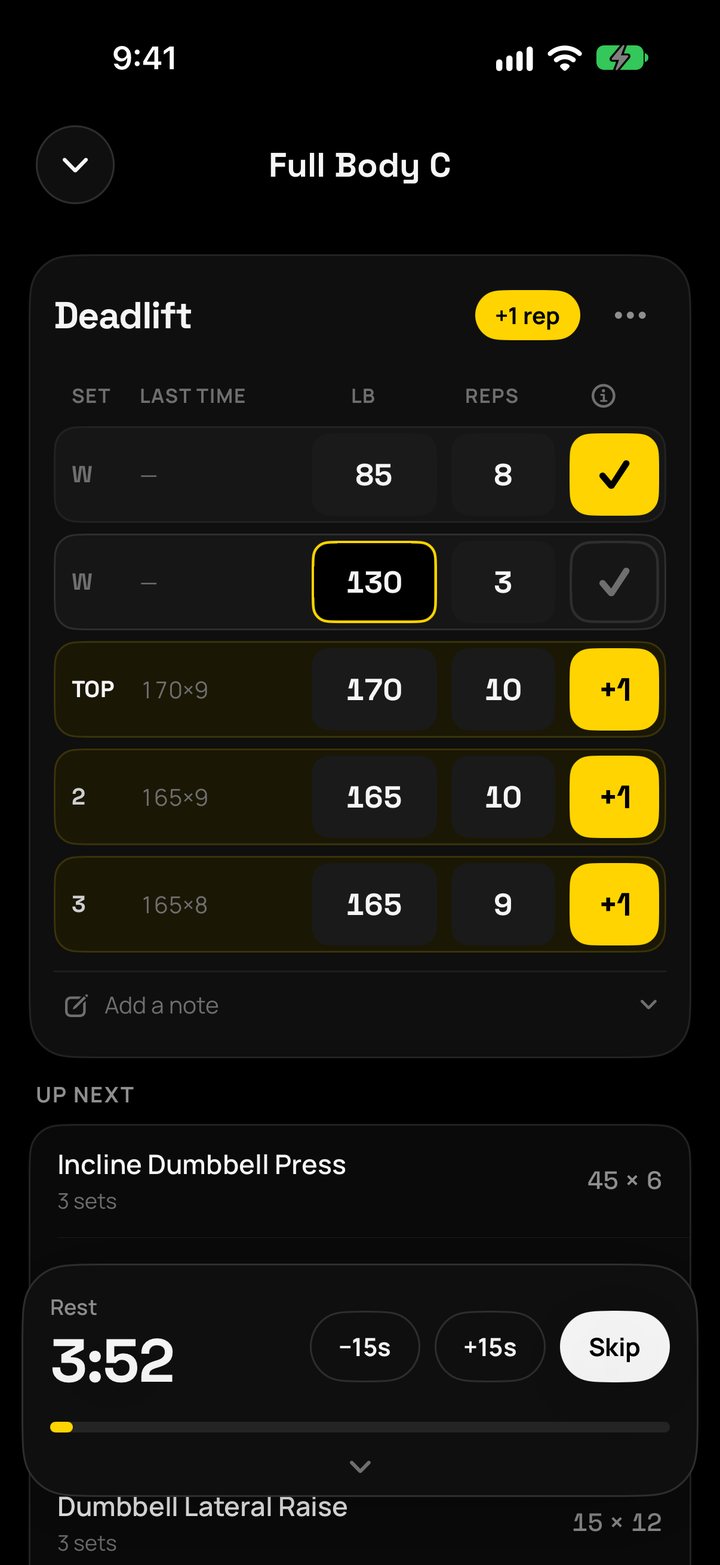
Plus One workout: Deadlift at 170 and 165 lb, every working set marked +1 for beating last time, rest timer running
Every finish

See what moved.

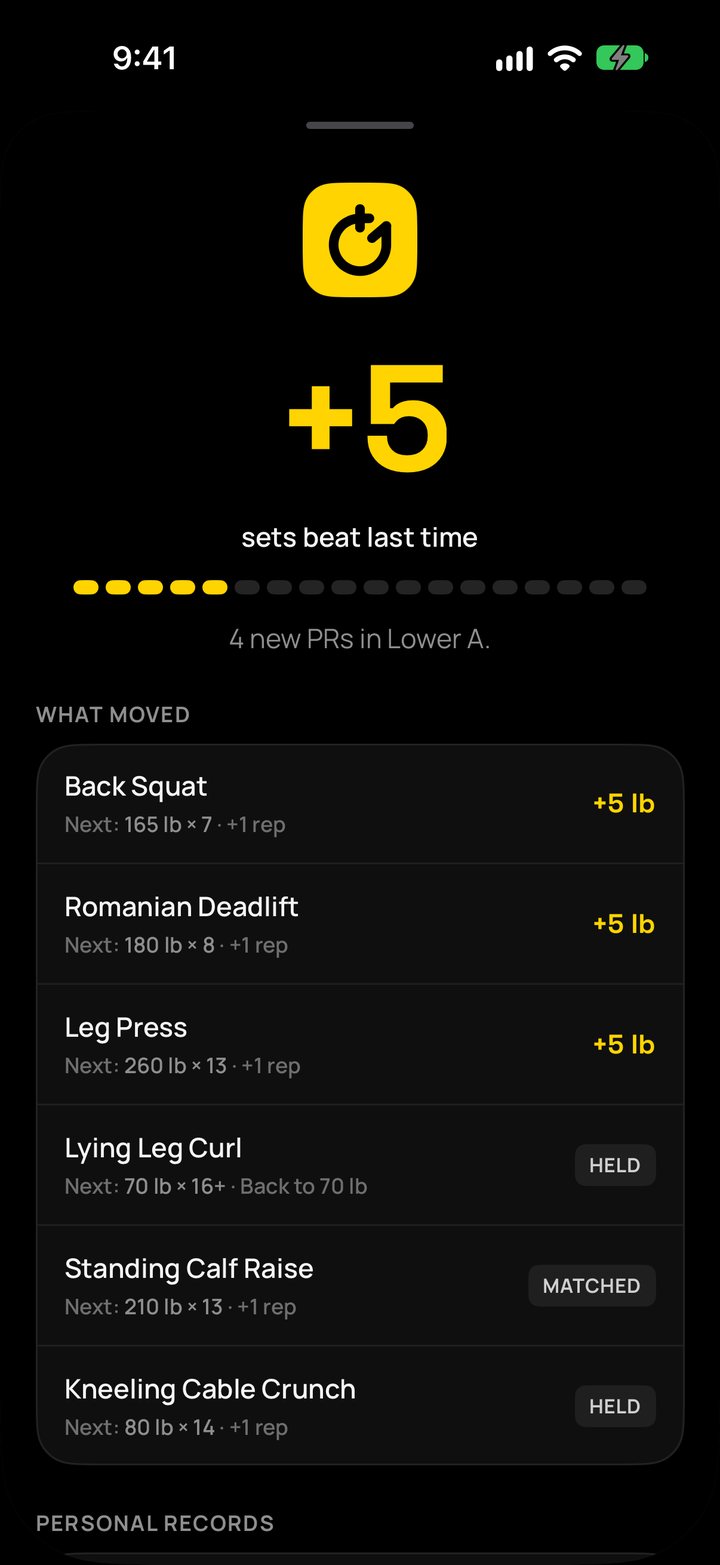
Finish a workout and Plus One shows how many sets beat last time, which lifts moved up, your new personal records, and the next target for every lift.

  • Fair comparisons. Sets are compared by estimated strength, so 140 × 8 and 135 × 10 are measured on the same scale.
  • Records that mean something. Change your grip or depth? Mark it as a new variation and it starts a fresh comparison.
Workout summary: +5 sets beat last time, 4 new personal records, Back Squat up 5 lb
Programs

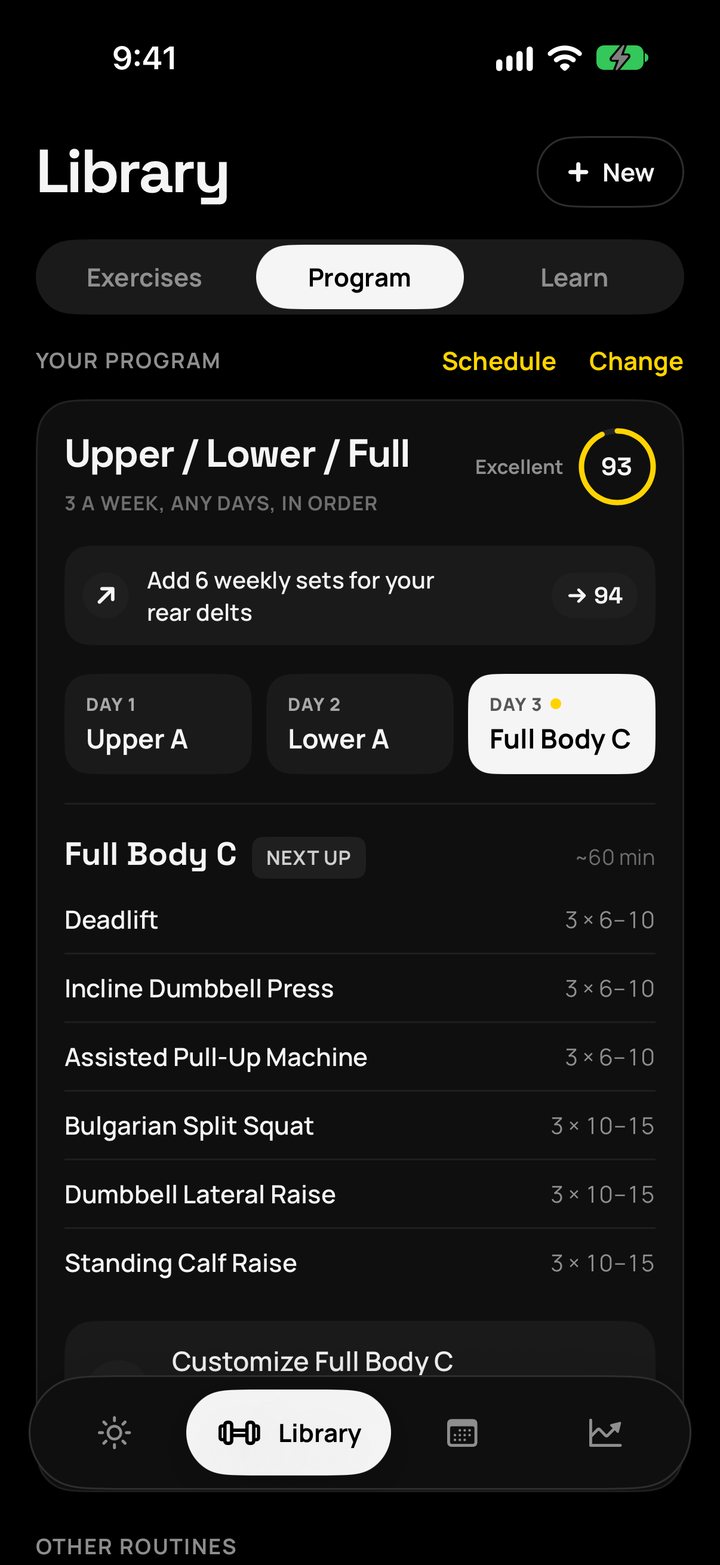
A program built for you, with a score to prove it.

Answer a few questions about your goal, experience, days per week and equipment. Plus One builds a program from evidence-based templates, from a one-day Big Six to Push / Pull / Legs.

  • Program Score from 0 to 100. Rated on weekly sets per muscle, how often each muscle is trained, and session length.
  • Live as you edit. Change a routine and watch the score move, with suggestions for the biggest wins.
  • Flexible schedule. Train any days you like, or pick set weekdays. 1 to 6 days a week.
Upper / Lower / Full program with a Program Score of 93
Progress

Watch your strength climb.

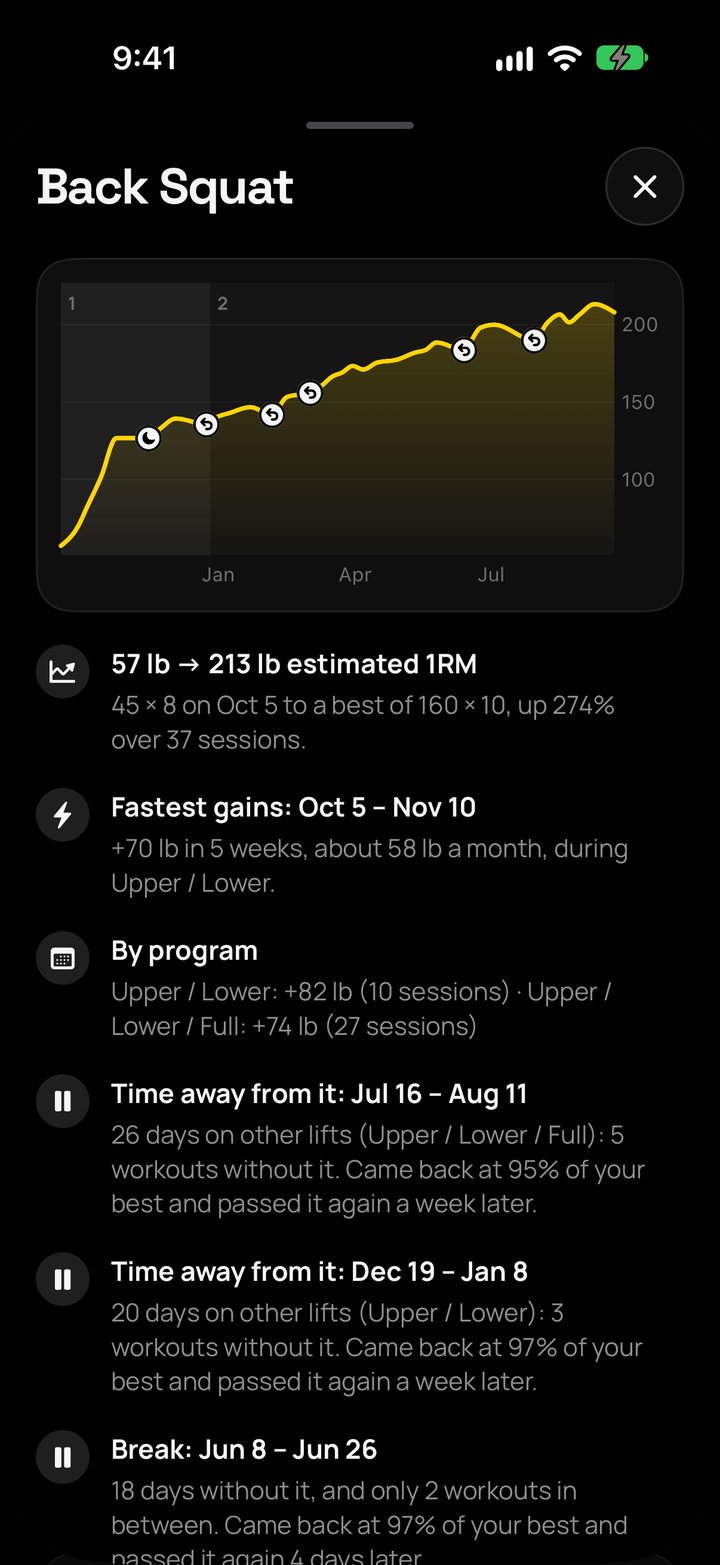
A strength chart for every lift, with a plain-English explanation of what's changed. See your real gains since you started, not just your heaviest day.

  • Muscle heat map. See which muscles you trained this week, month or quarter, on a 3D body.
  • History in chapters. Workouts grouped by program, with a training calendar and streaks.
Back Squat strength over a year: estimated max from 57 lb to 213 lb, up 274 percent
Recovery

Push on good days. Hold on bad ones.

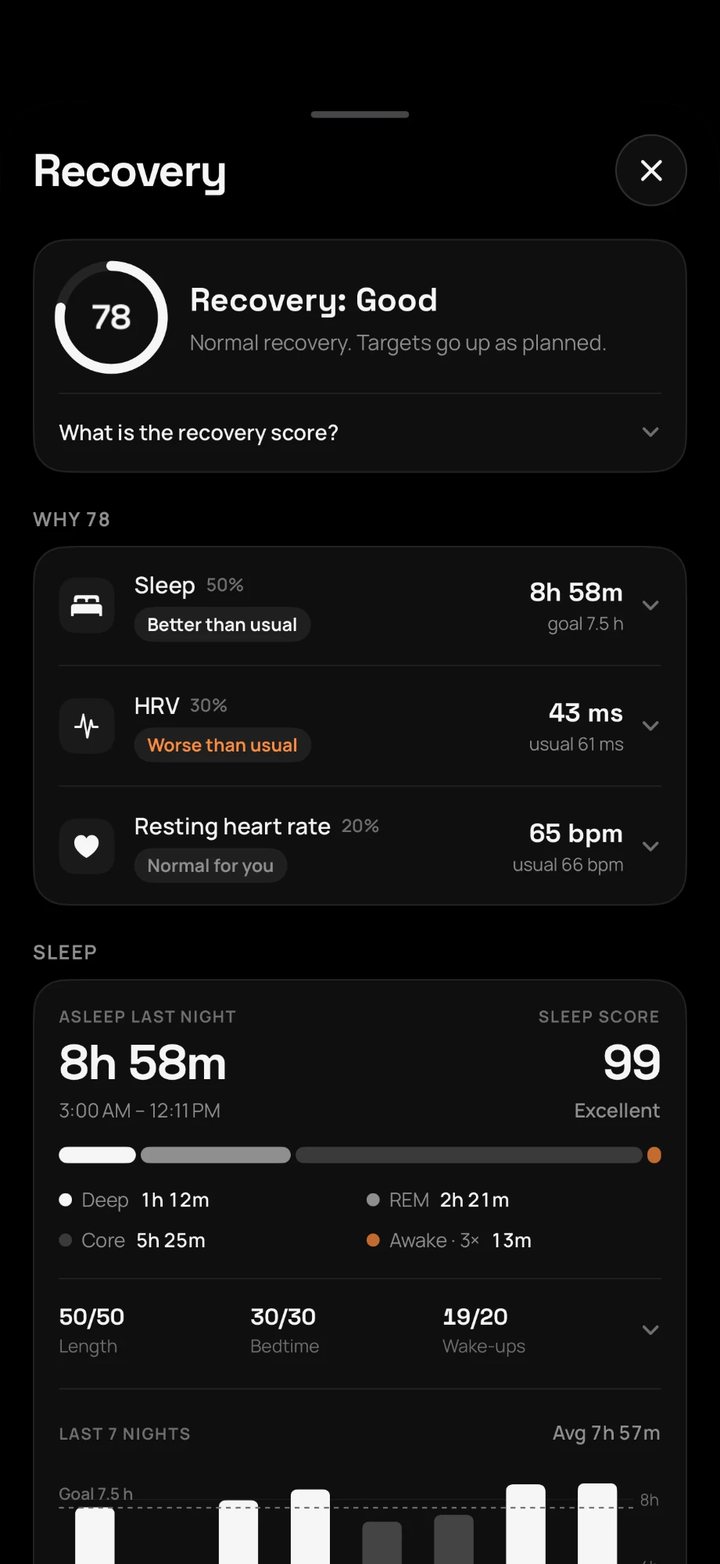
Connect Apple Health and Plus One turns your sleep, overnight HRV and resting heart rate into a daily recovery score, measured against your own normal.

  • Sleep-aware targets. When recovery is low, Plus One holds your weights instead of pushing them up.
  • Early warnings. A raised breathing rate or wrist temperature overnight can flag an off day before you feel it.
  • Saves to Apple Health. Workouts, how hard they felt, and weigh-ins you log.
Recovery score of 78 built from sleep, HRV and resting heart rate
Apple Watch

Leave your phone in the locker.

Plus One on Apple Watch runs the whole workout by itself. Your routines and today's targets live on your wrist, so you can lift with your iPhone across the gym, in your bag, or at home.

  • One timer, everywhere. Rest counts down on your wrist, on the Lock Screen and in the Dynamic Island, always in step. Skip or add 15 seconds from any of them.
  • Rest you can feel. A tap 10 seconds out, a buzz at zero, and a nudge every 15 seconds if your wrist is down.
  • Heart rate, live. See it as you lift, then your zones, your peak and how fast you recover between sets.

A whole workout, start to finish, on your wrist.

Every screen built for a glance between sets.

  1. 01

    Log with the Crown.

    The target is already filled in. Turn the Digital Crown to change it, tap Log set, done.

  2. 02

    Know you beat it.

    Beat last time and the rest screen says so. The ring empties as your rest runs out.

  3. 03

    One tap: how did it feel?

    Asked during the rest after a lift's last set, so it costs no time. Easy days earn a bigger step next time.
  4. 04

    Finish on your wrist.

    See how many sets beat last time, rate the session 1 to 10 for Apple Health, and close your rings.

No phone needed

Saved on your wrist. Synced when you're back.

Every set, rest and effort is saved on the watch the moment you log it. When your iPhone is back in range, it all lands in your log, once and in order. Nothing to tap, nothing lost.

  • Works offlineNo phone, no Wi-Fi, no problem
  • Exactly onceEvery set syncs one time, never doubled
  • Both waysLog on either device mid-workout
Ear breaks

Quiet between sets. Loud when it counts.

Plus One turns your music down while you rest, plays a soft cue when it's almost time, and brings the volume back for your next set. Your ears get a break every few minutes, and you never have to look at your phone.

Set · music at full Bench Press · Set 3

Ear breaks

Whatever's playing, from Apple Music and Spotify to podcasts, dips for the length of your rest and comes back for the set.

A cue to get ready

A soft sound 15 or 30 seconds before rest ends. On Auto, heavy barbell lifts and new exercises get the full 30 to set up.

Then, Go

A second cue lands right on zero, and your music comes back up with it. Even with your phone locked in a pocket.

Headphones only

Cues play only when headphones are connected, so you never chime the whole gym. AirPods, Bluetooth or wired.

Hear the cues.

Two sounds made for Plus One. Pick one in Settings. Best with headphones.

Plate
Chime

Why your ears need the break.

1 billion+young adults are at risk of permanent, avoidable hearing loss from unsafe listening.
40 h → 4 hA week's safe listening at 80 dB is 40 hours. At 90 dB, it's just 4.
~80%of a lifting session is rest. 16 sets with 2½-minute rests is about 40 minutes of the 50.

Hearing damage from loud sound is permanent, and it builds up quietly. The World Health Organization advises giving your ears frequent breaks from loud sound, because it helps the sensory cells inside them recover. Your rests are already breaks. Plus One makes them quiet ones.

Sources: WHO, Deafness and hearing loss and Safe listening. Ear breaks lower your music during rest; they aren't a medical device, so keep the volume sensible.

And the rest

Everything a serious log needs.

386 exercises

Each with a muscle map showing what it trains. Add your own anytime.

Your gym, your gear

Full gym, home gym, dumbbells only, hotel or bodyweight. Lifts swap to what you have.

Freestyle mode

Rather train on feel? Turn off targets and keep the logging, history and charts.

Widgets

Today's +1 on your Home Screen and Lock Screen.

iCloud sync

Your log follows you to a new iPhone through your own iCloud.

The why, cited

Every rule in the app is explained in Learn, with links to 23 published studies.

lb or kg

Set it for the whole app, or per lift for that one machine labeled in kilos.

Every set type

Warm-ups, top sets, back-offs and drop sets, with notes for next time.

Change plans mid-workout

Machine taken? Search for a swap. Reorder sets with a swipe and move lifts around as you go.

Privacy

Your training stays yours.

Plus One has no servers of its own. Your data lives on your devices and in your own iCloud.

No account

No sign-up, no password, no email needed to use the app.

No ads or tracking

No analytics, no ad networks, no third-party SDKs in the app.

Health data on device

Heart rate, sleep and other Apple Health data stay on your iPhone.

Your iCloud, your call

Your training log syncs through your private iCloud. Turn it off anytime.